
Find Baytown Traffic Court Records
Baytown traffic court records are managed by the Baytown Municipal Court, which handles traffic citations and Class C misdemeanor cases for the city. Located in Chambers County near the Houston metro area, Baytown has a dedicated online portal where you can search for cases by citation number, date of birth, or vehicle information. This guide covers how to find your records, what options you have for a citation, and how to resolve outstanding warrants or fines.
Baytown Quick Facts
Baytown Municipal Court
The Baytown Municipal Court is located at 3120 N Main, Baytown, TX 77521. The court's main phone number is 281-427-9511. It handles traffic citations, city ordinance violations, and other Class C misdemeanor cases for people stopped within Baytown city limits.
When you get a traffic ticket from Baytown police, your citation will list the response deadline and your options. You must respond by that date. If you miss it, the court can issue a warrant and add fees to what you already owe. Acting early gives you more choices.
| Department | Baytown Municipal Court |
|---|---|
| Address | 3120 N Main, Baytown, TX 77521 |
| Phone | 281-427-9511 |
| Online Payment | municipalonlinepayments.com/baytowntx |
| Jurisdiction | Class C misdemeanors, city ordinance violations |
Baytown sits near the border of Chambers and Harris counties. Most city traffic enforcement falls under Chambers County jurisdiction, but the court handles cases the same way regardless of the county overlap. If your stop was outside city limits, check whether a JP court or the Chambers County system has your case instead.
Search Baytown Traffic Court Records
The online portal at municipalonlinepayments.com/baytowntx/court/search lets you look up Baytown citations by citation number and date of birth. It shows case status, the amount owed, and payment options. You can pay with Visa through this portal.
Baytown also has a vehicle search tool at baytowntx.municipalonlinepayments.com/baytowntx/court/search-by-vehicle. This lets you search by license plate number or VIN. It is useful if you need to look up outstanding citations tied to a specific vehicle rather than a person.
The re:SearchTX statewide portal also covers Baytown Municipal Court cases. You can search there by name or case number. re:SearchTX is updated nightly, so very recent citations may not show up immediately. It is a good second source if you are trying to get a broader picture of someone's court history.
For Chambers County court records beyond the municipal level -- such as JP court cases or serious traffic charges elevated to county level -- use the Chambers County court resources.
Baytown Online Payment Portal
The Baytown online payment portal lets you search for citations by number and date of birth, view amounts owed, and pay by Visa.
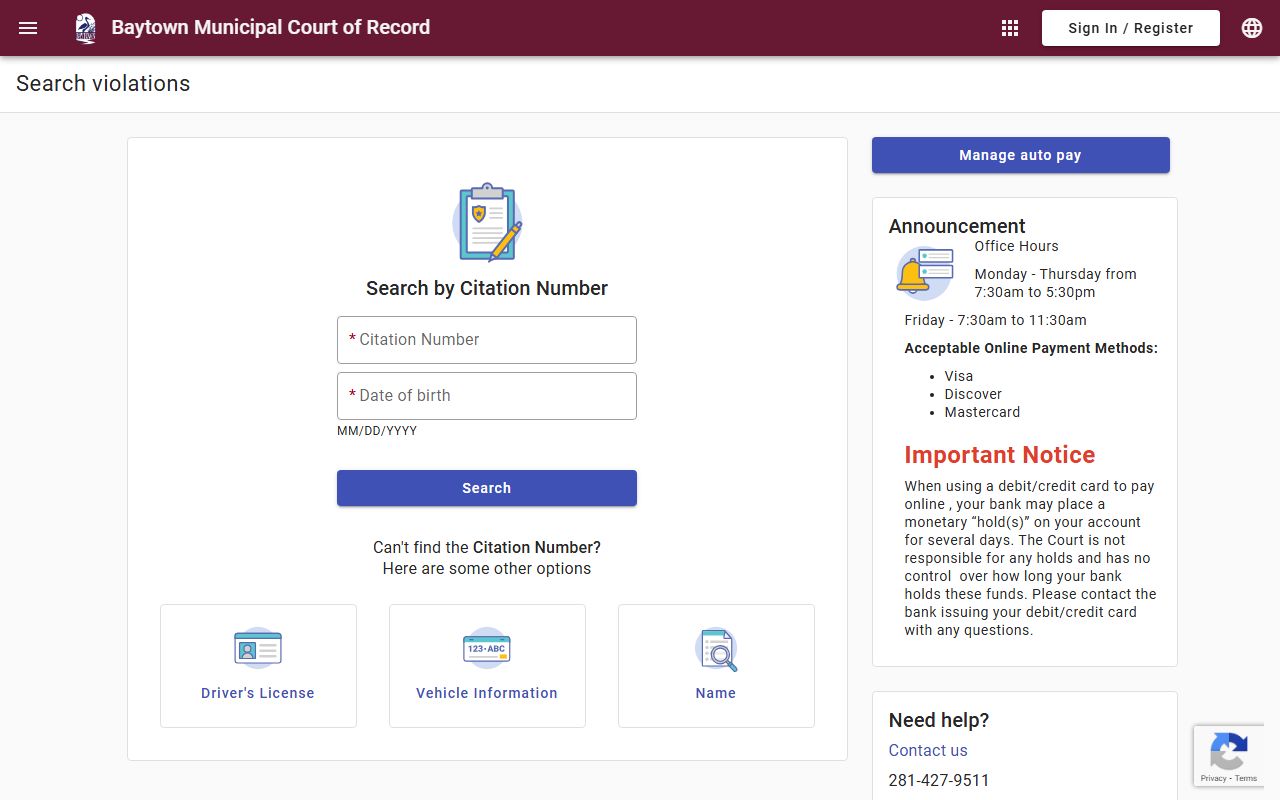
The portal also includes a vehicle search option so you can look up citations tied to a license plate or VIN.
Your Options for a Baytown Traffic Citation
Texas law gives you several ways to handle a traffic citation. Each one affects your driving record differently. Know your options before you pay.
Paying the fine outright is the most straightforward path. You can do it online through the Baytown payment portal, in person at the court, or by mail. Paying counts as a conviction and gets reported to Texas DPS. That means it goes on your driving record. If this is your first ticket in a while, it may not matter much. But if you already have violations on your record, adding another conviction can push you closer to a suspension.
Deferred disposition is a way to keep the ticket off your record. You plead guilty or no contest, pay a fee, and then complete a probation period -- typically 90 days -- without picking up another violation. If you do that successfully, the case is dismissed and does not count as a conviction. You request this option through the court, usually before or on your appearance date.
A driver safety course is another option that keeps the ticket off your record. You must request it before your court date. You plead guilty or no contest, pay court costs plus an administrative fee, and then complete a six-hour state-approved driving safety course within 90 days. After finishing, you submit your certificate and a copy of your Texas driving record. The case is dismissed. You must have a valid Texas license and current insurance, cannot have a CDL, and cannot have used this option for another ticket within the past 12 months.
You can also plead not guilty and request a trial. A judge hears the case and decides. This takes more time but is your legal right under Texas law.
Baytown Traffic Warrants
If you do not respond to a Baytown citation by the deadline, the court can issue a warrant. Alias warrants go out for failure to appear. Capias pro-fine warrants go out for unpaid fines after judgment. Both types can lead to arrest and additional fees.
You can check warrant status through the Baytown online portal or by calling the court at 281-427-9511. Once you find a warrant, contact the court to discuss how to clear it. Options usually include paying the full amount, posting a bond, or setting up a payment plan depending on the circumstances.
Do not assume a warrant will go away on its own. It stays in the system and can show up during any traffic stop or license renewal check in Texas. The sooner you deal with it, the fewer extra fees you accumulate.
How to Pay Baytown Traffic Fines
Online payment is available 24/7 through the Baytown court portal. The portal accepts Visa. A convenience fee applies to online transactions. This is the fastest way to close out a citation if you just want to pay and move on.
In-person payment at the courthouse at 3120 N Main is available during normal business hours. Cash, check, and card are typically accepted in person. Call 281-427-9511 to confirm accepted payment types and current hours before visiting.
If you cannot pay the full amount at once, reach out to the court before your deadline. Waiting until a warrant is issued limits your options and adds costs. The court may be able to set up a payment plan in some situations.
Texas Traffic Laws That Apply in Baytown
Baytown traffic citations fall under the Texas Transportation Code. Chapter 542 covers general definitions. Chapter 543 covers the citation and hearing process. Chapter 545 covers rules of the road, including speed limits, lane changes, and right of way.
City ordinances may add local rules on top of state traffic law. The Baytown Municipal Court handles both state code violations and city ordinance violations. Your citation will typically note which law was violated.
The TexasCourtHelp traffic page is a useful plain-language resource for understanding your rights in a Texas traffic case. The Texas Judicial Branch website has official court rules and forms for all levels of Texas courts.
Nearby Cities
Other cities near Baytown with their own traffic court records:
Chambers County Traffic Court Records
Baytown is in Chambers County. County-level traffic cases and more serious charges go through the Chambers County court system.